Wednesday, August 11, 2010

Basic Usage of LWUIT4IO

Last week I wrote about LWUIT4IO but didn't really explain how to utilize it properly and what makes it completely different from just using the GCF (Generic Connection Framework: Connector.open etc.).

Normally in MIDP you would just connect to the internet using Connector.open(String, ?) and get a connection object or a stream. The process seems simple enough but there are lots of hidden caveats in this process. For instance you would need to handle errors in case they happen (and they often do on a mobile device), in which case you need to show an error dialog (which is usually very uniform for all the connections you have in your application.
You also need to conduct the networking in a separate thread that is neither the LWUIT nor the default MIDP thread since these threads will block the UI from updating. After finishing every operation or in case of an exception it is critical in MIDP to cleanup all the connections/streams appropriately. Developers often forget to do this because the GC often removes that need, but with the GCF it is often critical to invoke close() otherwise native resources won't be freed and might cause issues on some devices (very common issue in feature phones).

LWUIT4IO tries to solve all of these by hiding the entire process of networking behind a component API, e.g. to connect to a URL and fetch its content in LWUIT4IO one could do just:
NetworkManager.getInstance().addToQueue(myRequest);

You do first need to initialize LWUIT4IO by invoking (similar to the need of invoking Display.init once):
NetworkManager.getInstance().start();

The request object is a callback class that includes the URL/arguments and request method (get/post). The network thread will perform the connection and invoke the proper callback methods within the request object e.g.:
ConnectionRequest myRequest = new ConnectionRequest();
myRequest.setUrl("http://mysite.com/");
myRequest.addArg("arg", "value");
addResponseListener(new ActionListener() {
public void actionEvent(ActionEvent ev) {
NetworkEvent n = (NetworkEvent)ev;

// gets the data from the server as a byte array...
byte[] data = (byte[])n.getMetaData();
}
});

Alternatively one can override the code to read/write the request values e.g.:
ConnectionRequest myRequest = new ConnectionRequest() {
protected void readResponse(InputStream input) throws IOException {
// read from the input stream...
}
};

Besides the advantages of the more generic code, the true advantages you gain in using this approach is quite remarkable:
  • You don't need to write threading code - LWUIT callbacks (e.g. actionPerformed) are on the LWUIT EDT seamlessly. Everything else automatically goes to the network thread...
  • Exceptions are caught and handled without any need to do anything.
  • You don't need to close streams or connections ever!
  • All streams are buffered so you don't need to worry abound efficiency of reading from a data input stream.
  • You can utilize inheritance and reuse code far more extensively
  • Cookies, redirects work pretty much like you would expect without any additional code.

Thursday, August 5, 2010

LWUIT 1.4 Finally Released

Its taken some time since our intended release date and by not allot has changed in the SVN but the 1.4 binary release is finally official! Get it here.

This release is very important since it marks our first release under Oracle which will hopefully make the next LWUIT release smoother now that we understand the process.

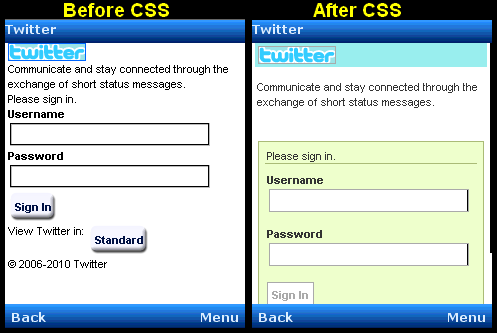
This is mostly a stability and bug fix release with the major feature being the new XHTML component which includes CSS support. Besides that we finally have a multi-line text field, allowing lightweight customizable input to span more than one line. We also added tools to customize the LWUIT VKB for some advanced use cases. Last but not least we introduced some more advanced animations than the previous static animation support.

Monday, August 2, 2010

Introducing LWUIT For IO (LWUIT4IO)

When Chen started LWUIT he limited his ambitions to solving the UI portability issues and with those limited ambitions we were able to over deliver by providing a framework that delivered an easier, faster & better UI while still maintaining the portability advantage.
The limited scope of LWUIT is one of its strengths allowing us to focus on the issues at hand and not stray too much.
IO (storage, filesystem & network) is probably the biggest and most common portability stumbling block after UI & with LWUIT4IO we aim to simplify the process of working with these API's across platforms/devices without sacrificing portability or vendor specific features. The underlying API's are given the "LWUIT treatment" where we abstract lots of the thread related heavy lifting behind and component like unified API and try to make the whole process reasonably fool proof.

LWUIT4IO is fully optional, at it depends on LWUIT but the reverse isn't true. LWUIT has no dependency on LWUIT4IO and we intend to keep it this way since we assume many of you have written elaborate IO frameworks of your own and might not be ready to switch.

If you do decide to switch here are some of the things we worked on for LWUIT4IO and some of the features we have in our pipeline (notice that LWUIT4IO being brand new is still labeled as alpha quality software):

  • Component based connections - Network connections are made with objects and callback events. When a response finishes its processing on the network thread it seamlessly transitions to an event on the LWUIT thread.
  • LWUIT Component integration - currently the new slider component seamlessly shows progress indication in the IO framework. We plan to seamlessly integrate the HTML component as well making it both more efficient and easier to use.
  • Buffering - all network connections in LWUIT4IO are seamlessly buffered providing easier programming (no need to manually buffer) and faster downloads.
  • Timeout support - GCF (MIDP's Generic Connection Framework) doesn't support thread timeouts. LWUIT4IO compensates for that by providing timeouts on platforms that support them and "faking" timeouts on platforms that don't (such as MIDP) by abandoning the network thread and creating a new one seamlessly.
  • Cookies - server cookies are managed seamlessly by LWUIT4IO.
  • Filesystem - the LWUIT4IO portable filesystem API is simpler and more portable than JSR75.
  • Storage - LWUIT4IO supports named storage streams to place data within application specific named streams. This is based on RMS when running on MIDP but provides an easier to use stream based API.
  • Serialization - LWUIT4IO supports a simple object serialization API for application state saving.
  • Access Point - LWUIT4IO provides an API for detecting the available internet access points for the device and picking the right one. This is device specific and works seamlessly on devices that support it such as newer Symbian devices and RIM devices.
  • Unified Error Handling - LWUIT4IO supports error handling as LWUIT events as well as a single point error handler.
  • JSON Parser - LWUIT4IO ships with a simple JSON parser. We plan to expose the existing LWUIT HTML XML parser in future versions of LWUIT to make REST programming easier in LWUIT.
  • Caching Framework - LWUIT4IO contains a smart caching system that keeps frequently used elements in RAM and optionally reverts to using storage cache.
  • Mutli-threaded networking (experimental) - LWUIT4IO supports seamless integration with many network threads while assigning specific duties to specific threads if so desired.
  • Default connectors - simple web services are already implemented for convenience and reference in LWUIT4IO such as Google REST search, Twitter & image download service.
I encourage you to take a look and file issues on LWUIT4IO so we can get it to the same point as LWUIT. It is now a part of the LWUIT SVN under the extensions directory, have fun...
Default Connectors - e.g. File download connector

Thursday, July 29, 2010

Sliding It Back To My First Post

My very first post in this blog (May 2008) was about creating a progress indicator component. At the time LWUIT only had one style per component and the post was mostly about threading in LWUIT. Over that time we considered adding a progress indicator component frequently but had a very difficult issue with its customization. How can we create a component which is both powerful enough for general usage and not too restricted for the various use cases.

Enter the new Slider component which thanks to some advantages such as the multiple styles is far more powerful than the original and it is now a part of LWUIT. The slider can be manipulated like a gauge to control elements such as volume, it can be used to indicate position (with a text overlay inherited from Label) and it can be customized in pretty much any way imaginable.


The demo you see to your right is ridiculously simple containing 3 such sliders, the top and middle one are identical with the middle one adding a status overlay. The bottom slider is set for infinite progress support which is useful to indicate a "please wait" status.


To create such a theme I just customized the "Slider" and "SliderFull" styles with a border for the full state and the empty state (essentially the squares in the center are just the style of SliderFull painted on top of a style of Slider).


final Slider s1 = new Slider();

f.addComponent(s1);


final Slider s2 = new Slider();

s2.setRenderPercentageOnTop(true);

f.addComponent(s2);


Slider s3 = new Slider();

f.addComponent(s3);

s3.setInfinite(true);

new Thread() {

private boolean dir = true;

private int val = 0;

public void run() {

try {

sleep(1000);

while (Display.getInstance().getCurrent() == f) {

sleep(100);

s1.setProgress(val);

s2.setProgress(val);

if (dir) {

if (val > 100) {

dir = false;

}

val++;

} else {

if (val < 1) {

dir = true;

}

val--;

}

}

} catch (InterruptedException ex) {

ex.printStackTrace();

}

}

}.start();


Wednesday, July 21, 2010

The Highest Common Denominator Strategy

Normally I try to keep my blog posts on the technical or showcase side but for a change I want to share some general thoughts I have about the state of LWUIT and the recent enlightening poll on this blog and the javalobby.

While there is still a day to go with our poll as I write this, the results are quite interesting and not what I expected. Although in retrospect they make sense, after all this is a blog for an open source project so it makes sense that most of you would vote to open source FX. However, the blog poll otherwise is almost identical to the JavaLobby poll in the sense that 70% of the votes voted for either open sourcing FX or giving up on it altogether (visitors to the JavaLobby preferred giving up on FX while visitors to this blog preferred open sourcing).
This got me thinking a bit, is this the typical knee jerk reaction of "open sourcing will solve everything" or is there something specific in JavaFX that you saw and would want it to be open source?
Please be specific in the comments and if possible try to describe the experience you have with FX.

On to a completely different subject... I was talking to a friend in the states a while back about LWUIT's portability to various platforms. He claimed that portability is problematic since the native platform will come out with new features which the application will need to assimilate meaning a constant race against the native OS and constantly providing an inferior experience.

I attacked that notion with the "Highest Common Denominator" approach we are trying to instill using LWUIT. Most native OS's (even the shiny new ones) are ridiculously huge beasts with heavy dependencies that tend to stagnate immediately. Even a small change to the underlying GUI core will break at least 20% of the 3rd party applications and cause the applications shipping with the OS heavy maintainability costs...

Since LWUIT is statically linked changes to LWUIT don't break everything so we are bold in our changes where OS manufacturers are timid and fragmented...

This means that OS's don't activate big changes by default since these changes cause huge regressions. A great example is touch scrolling on Symbian phones that took quite a while to provide the proper kinetic/tensile drag feel you get from comparable devices or even Nokia's own N900.

However, LWUIT on Nokia devices provided kinetic and later on tensile drag on all Symbian touch phones including those that don't "officially" support this functionality. Essentially LWUIT provided features that are "superior" to the native platform thus escaping the original "lowest common denominator" issue of portable code and striking back with a higher baseline of functionality. This isn't limited to Symbian, I recently demonstrated "Android like" thumb scrolling in LWUIT which is in some ways superior to the native Android scrolling. It allows device rotation while scrolling, is fully customizable and still allows tensile lists...

A highest common denominator strategy is harder to maintain since it requires a developer keeps his vigil over new platform features to introduce them immediately. A developer must also work against the LWUIT trunk where the new features are introduced constantly to support such development. The benefit however is in the ability to carry these features to the platforms that are behind which puts the developer at a vantage point in those platforms.

We believe that LWUIT enables this strategy and we are working hard to make this strategy practically seamless to anyone using LWUIT, most of our work and improvements (e.g. the major style change in 1.2) is designed around this premise.

Friday, July 16, 2010

How Can Oracle Make JavaFX More Popular?

The guys at the JavaLobby asked "How Can Oracle Make JavaFX More Popular?", however the discussion seems to be hopelessly slanted towards the desktop crowd and a couple of Android related posts.
I'm quite curious to see what the thoughts of the crowd visiting this blog which mostly focuses on mobile and LWUIT. So I added a poll to the top of the blog, please vote your heart and try not to stuff the ballots ;-)

Thursday, July 15, 2010

Grow Your Container With This Fool Proof Method

Growing stuff is usually the subject filling my spambox... But into my inbox came a question from Terrence on how to grow a container.
Generally what he wanted was an effect similar to the one found on Google maps (that you can see in the video right here).
I tried to implement something like this in the most generic way possible which required a minor tweak to LWUIT (allowing us to restore the original preferred size of a component).

Generally the whole grow/shrink logic is contained in one method: "grow". Its relatively simple and just creates a motion between the current size of the component and the preferred size thus allowing the new component to "grow into place". The motion updates the preferred size and relayouts the form to create the smooth animation effect we see in the video.

I needed the ability to restore the default preferred size otherwise I would be stuck in the larger size after animating once. An alternative solution would have been to use a custom Container sublclass or to keep the original values stored neither one of which is my favorite...

Another "complexity" relates to the rather complex nature of preferred size, text area reports a relatively large preferred size before layout actually occurs. The reason is that it can't possibly know the target size of the container it will be placed in so it just guesses. So to support this situation I needed to layout the text area once in order to allow it to fit into place.

The code for this demo is in the incubator and pasted bellow:
public class GrowMidlet extends MIDlet {
private static final String LONG_TEXT_1 = "There is some text that should take more than one line to show so it will be cut off at some point when shown in a single line but when we show it as multiline it should work out and layout just fine and dandy... ";
private static final String LONG_TEXT_2 = "Growing text can be longer or shorter, it can be placed in the middle of the screen or anywhere really this is quite generic!";
private static final String LONG_TEXT_3 = "Using this is as simple as pie with any container type you can think of and any text length!";
public void startApp() {
try {
Display.init(this);
Resources r = Resources.open("/pimpTheme.res");
UIManager.getInstance().setThemeProps(r.getTheme(r.getThemeResourceNames()[0]));
Form f = new Form("Grow Demo");
f.addComponent(createGrowingContainer(LONG_TEXT_1, "TextAreaMe"));
f.addComponent(createGrowingContainer(LONG_TEXT_2, "TextAreaThem"));
f.addComponent(createGrowingContainer(LONG_TEXT_3, "TextAreaMe"));
f.show();
} catch (IOException ex) {
ex.printStackTrace();
}
}

private Container createGrowingContainer(String text, String uiid) {
final Container growingContainer = new Container(new BorderLayout());
final Label oneLine = new Label(text);
final Button grow = new Button("more...");
final TextArea multiLine = new TextArea(text);
final Button shrink = new Button("less...");
multiLine.setUIID("Label");
growingContainer.setUIID(uiid);
multiLine.setGrowByContent(true);
multiLine.setSingleLineTextArea(false);
growingContainer.addComponent(BorderLayout.CENTER, oneLine);
growingContainer.addComponent(BorderLayout.EAST, grow);
grow.addActionListener(new ActionListener() {

boolean firstTime = false;

public void actionPerformed(ActionEvent evt) {
growingContainer.removeAll();
growingContainer.addComponent(BorderLayout.CENTER, multiLine);
Container flow = new Container();
if (shrink.getParent() != null) {
shrink.getParent().removeAll();
}
flow.addComponent(shrink);
growingContainer.addComponent(BorderLayout.SOUTH, flow);
// the first time around the text area doesn't report the correct preferred size
// since it doesn't know its screen placement
if (firstTime) {
growingContainer.revalidate();
}
grow(growingContainer);
growingContainer.revalidate();
}
});
shrink.addActionListener(new ActionListener() {

public void actionPerformed(ActionEvent evt) {
growingContainer.removeAll();
growingContainer.addComponent(BorderLayout.CENTER, oneLine);
growingContainer.addComponent(BorderLayout.EAST, grow);
grow(growingContainer);
growingContainer.revalidate();
}
});
return growingContainer;
}

private void grow(final Component c) {
final Motion wMotion = Motion.createSplineMotion(c.getWidth(), c.getPreferredW(), 300);
final Motion hMotion = Motion.createSplineMotion(c.getHeight(), c.getPreferredH(), 300);
wMotion.start();
hMotion.start();
c.setPreferredSize(new Dimension(c.getWidth(), c.getHeight()));
c.getComponentForm().registerAnimated(new Animation() {
public boolean animate() {
if(wMotion.isFinished() && hMotion.isFinished()) {
c.getComponentForm().deregisterAnimated(this);
c.setPreferredSize(null);
c.getComponentForm().revalidate();
return false;
}
c.setPreferredSize(new Dimension(wMotion.getValue(), hMotion.getValue()));
c.getComponentForm().revalidate();
return false;
}

public void paint(Graphics g) {
}
});
}

public void pauseApp() {
}

public void destroyApp(boolean unconditional) {
}
}