We are looking for feedback on release 1.4 of LWUIT for internal promotion within Oracle, we might try to form a more organized survey for a later date but right now we want to get general abstract impressions.
Have you updated to 1.4, if not when do you plan to do this? What features of 1.4 do you like? Which features are you using? Where do you see LWUIT going for the next version? What would you like to see in LWUIT?
Feel free to rant and provide abstract thoughts/context.
Thanks.
Showing posts with label LWUIT J2ME JavaME. Show all posts
Showing posts with label LWUIT J2ME JavaME. Show all posts
Wednesday, September 1, 2010

Thursday, August 5, 2010
LWUIT 1.4 Finally Released
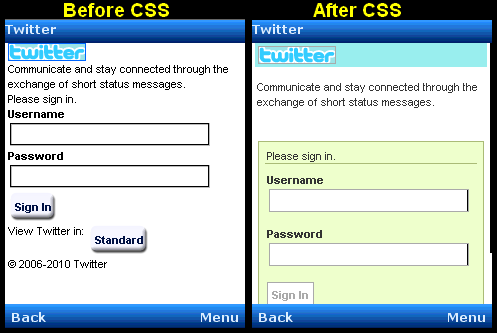 Its taken some time since our intended release date and by not allot has changed in the SVN but the 1.4 binary release is finally official! Get it here.
This release is very important since it marks our first release under Oracle which will hopefully make the next LWUIT release smoother now that we understand the process.
This is mostly a stability and bug fix release with the major feature being the new XHTML component which includes CSS support. Besides that we finally have a multi-line text field, allowing lightweight customizable input to span more than one line. We also added tools to customize the LWUIT VKB for some advanced use cases. Last but not least we introduced some more advanced animations than the previous static animation support.
Monday, October 12, 2009
LWUIT Binaries Are Now At java.sun.com Only
 Our binaries are no longer hosted on java.net to avoid confusion between the binary drops and the source version. All of LWUIT binary elements are now a part of the new LWUIT product page at java.sun.com.
The java.net project home page and forum are still the development hub for discussion and ongoing development.
Saturday, September 19, 2009
LWUIT Finally On java.sun.com

LWUIT is now finally featured among other prominent Java ME technologies in its own page on java.sun.com. Its been a great ride taking LWUIT from a small project that Chen started on the side and seeing it materialize.
Friday, September 4, 2009
New LWUIT Introduction Screencast
Just in case you don't follow Terrence's blog (which you should), he just posted links to a set of screencasts one of which is a great LWUIT screencast available here.
This is a useful link to send out to your boss/colleagues who aren't familiar with LWUIT and want a quick and easy introduction/overview of the subject matter.
In other news I got a copy of the new LWUIT book and I will post a review shortly...
This is a useful link to send out to your boss/colleagues who aren't familiar with LWUIT and want a quick and easy introduction/overview of the subject matter.
In other news I got a copy of the new LWUIT book and I will post a review shortly...
Tuesday, August 25, 2009
New Stuff In LWUIT
Due to the update on Java.net and various updates going around some news got lost a bit in the past couple of days. Most importantly, we just released LWUIT 1.2.1 which is a bug fix release that addresses some of the issues in the current drop mostly in the Ant task which we have no other way of delivering (since it isn't yet open source).
Another thing that was probably lost is a release of our internal BlackBerry port of LWUIT, based on many fixes from Thorsten Schemm it is still not as mature as his LWUIT-incubator port neither in terms of usage or in terms of stability/functionality. We are working to converge the best approaches from both ports and create a single functional port in the long run.
We will now set our attention towards 1.3, we already have some features planned and we are considering some other ideas. I would personally like to remove some deprecated and no longer supported API's to reduce the size of LWUIT, I already started a bit in that direction and got approximately 15kb less.
Another thing that was probably lost is a release of our internal BlackBerry port of LWUIT, based on many fixes from Thorsten Schemm it is still not as mature as his LWUIT-incubator port neither in terms of usage or in terms of stability/functionality. We are working to converge the best approaches from both ports and create a single functional port in the long run.
We will now set our attention towards 1.3, we already have some features planned and we are considering some other ideas. I would personally like to remove some deprecated and no longer supported API's to reduce the size of LWUIT, I already started a bit in that direction and got approximately 15kb less.
Sunday, August 31, 2008
Porting LWUIT - The LWUIT Micro Backend
 Porting LWUIT is something I need to blog on more, which is something I fully intend to do. In the meantime Guillaume Legris sent us a link to a port he is working on of LWUIT on top of the Micro Backend.
I wasn't even aware of the existence of the micro backend before this email, which shows off how open sourcing a product can result in such pleasant and unexpected surprises. If you are working on such porting projects we obviously will try to help, I also intend to start a series of posts about the task of porting LWUIT to other platforms in the near future.
Sunday, August 24, 2008
The Model (MVC): Million Contacts March
Swing's approach to MVC is one of the hardest concepts for people to fully grasp, which is a real shame as it is probably the most important and powerful feature in Swing. LWUIT copied Swing's approach to MVC almost entirely but at a smaller scale. Chen already blogged about renderers in the past but that is only one piece of the puzzle, to fully understand it we need to understand models... But first lets recap, what is MVC:
Model - Represents the data for the component (list), the model can tell us exactly how many items are in it and which item resides at a given offset within the model. This differs from a simple Vector (or array) since all access to the model is controlled (the interface is simpler) and unlike a Vector/Array the model can notify us of changes that occur within it.
View - The view draws the content of the model. It is a "dumb" layer that has no notion of what is displayed and only knows how to draw. It tracks changes in the model (the model sends events) and redraws itself when it changes.
Controller - The controller accepts user input and performs changes to model which in turn cause the view to refresh.
LWUIT's List component uses the MVC paradigm to separate its implementation. List itself is the Controller (with a bit of View mixed in). The ListCellRenderer interface is a View and the ListModel is (you guessed it by now) the model.
When the list is painted it iterates over the visible elements in the model and asks for them, it then draws them using the renderer.
Why is this useful?
Since the model is a lightweight interface it can be implemented by you and replaced in runtime if so desired, this allows several very cool use cases:
1. A list can contain thousands of entries but only load the portion visible to the user. Since the model will only be queried for the elements that are visible to the user it won't need to load into memory a very large data set until the user starts scrolling down (at which point other elements may be offloaded from memory).
2. A list can cache efficiently. E.g. a list can mirror data from the server into local RAM without actually downloading all the data. Data can also be mirrored from RMS for better performance and discarded for better memory utilization.
3. No need for state copying. Since renderers allow us to display any object type, the list model interface can be implemented by the applications data structures (e.g. persistence/network engine) which would return internal application data structures saving you the need of copying application state into a list specific data structure.
4. Using the proxy pattern (as explained in a previous post) we can layer logic such as filtering, sorting, caching etc. on top of existing models without changing the model source code.
5. We can reuse generic models for several views e.g. a model that fetches data from the server can be initialized with different arguments to fetch different data for different views. View objects in different Form's can display the same model instance in different view instances thus they would update automatically when we change one global model.
Most of these use cases work best for lists that grow to a larger size or represent complex data which is what the list object is designed to do.
To show this off lets create a list with one million entries... What I am trying to prove here is that a list and a model have a very low overhead when used properly. Most of the overhead for rendering a list is in the renderer and the model implementation, both of which you can optimize to your hearts content. This is a very small price to pay for something as flexible, powerful and customizable as the LWUIT list!
Model - Represents the data for the component (list), the model can tell us exactly how many items are in it and which item resides at a given offset within the model. This differs from a simple Vector (or array) since all access to the model is controlled (the interface is simpler) and unlike a Vector/Array the model can notify us of changes that occur within it.
View - The view draws the content of the model. It is a "dumb" layer that has no notion of what is displayed and only knows how to draw. It tracks changes in the model (the model sends events) and redraws itself when it changes.
Controller - The controller accepts user input and performs changes to model which in turn cause the view to refresh.
LWUIT's List component uses the MVC paradigm to separate its implementation. List itself is the Controller (with a bit of View mixed in). The ListCellRenderer interface is a View and the ListModel is (you guessed it by now) the model.
When the list is painted it iterates over the visible elements in the model and asks for them, it then draws them using the renderer.
Why is this useful?
Since the model is a lightweight interface it can be implemented by you and replaced in runtime if so desired, this allows several very cool use cases:
1. A list can contain thousands of entries but only load the portion visible to the user. Since the model will only be queried for the elements that are visible to the user it won't need to load into memory a very large data set until the user starts scrolling down (at which point other elements may be offloaded from memory).
2. A list can cache efficiently. E.g. a list can mirror data from the server into local RAM without actually downloading all the data. Data can also be mirrored from RMS for better performance and discarded for better memory utilization.
3. No need for state copying. Since renderers allow us to display any object type, the list model interface can be implemented by the applications data structures (e.g. persistence/network engine) which would return internal application data structures saving you the need of copying application state into a list specific data structure.
4. Using the proxy pattern (as explained in a previous post) we can layer logic such as filtering, sorting, caching etc. on top of existing models without changing the model source code.
5. We can reuse generic models for several views e.g. a model that fetches data from the server can be initialized with different arguments to fetch different data for different views. View objects in different Form's can display the same model instance in different view instances thus they would update automatically when we change one global model.
Most of these use cases work best for lists that grow to a larger size or represent complex data which is what the list object is designed to do.
To show this off lets create a list with one million entries... What I am trying to prove here is that a list and a model have a very low overhead when used properly. Most of the overhead for rendering a list is in the renderer and the model implementation, both of which you can optimize to your hearts content. This is a very small price to pay for something as flexible, powerful and customizable as the LWUIT list!
class Contact {
  private String name;
  private String email;
  private Image pic;

  public Contact(String name, String email, Image pic) {
      this.name = name;
      this.email = email;
      this.pic = pic;
  }

  public String getName() {
      return name;
  }

  public String getEmail() {
      return email;
  }

  public Image getPic() {
      return pic;
  }
}

class ContactsRenderer extends Container implements ListCellRenderer {

  private Label name = new Label("");
  private Label email = new Label("");
  private Label pic = new Label("");

  private Label focus = new Label("");

  public ContactsRenderer() {
      setLayout(new BorderLayout());
      addComponent(BorderLayout.WEST, pic);
      Container cnt = new Container(new BoxLayout(BoxLayout.Y_AXIS));
      name.getStyle().setBgTransparency(0);
      email.getStyle().setBgTransparency(0);
      cnt.addComponent(name);
      cnt.addComponent(email);
      addComponent(BorderLayout.CENTER, cnt);
  }

  public Component getListCellRendererComponent(List list, Object value, int index, boolean isSelected) {
      Contact person = (Contact) value;
      name.setText(index + ": " + person.getName());
      email.setText(person.getEmail());
      pic.setIcon(person.getPic());
      return this;
  }

  public Component getListFocusComponent(List list) {
      return focus;
  }
}
String[][] CONTACTS_INFO = {
  {"Nir V.","Nir.Vazana@Sun.COM"},
  {"Tidhar G.","Tidhar.Gilor@Sun.COM"},
  {"Iddo A.","Iddo.Arie@Sun.COM"},
  {"Ari S.","Ari.Shapiro@Sun.COM"},
  {"Chen F.","Chen.Fishbein@Sun.COM"},
  {"Yoav B.","Yoav.Barel@Sun.COM"},
  {"Moshe S.","Moshe.Sambol@Sun.COM"},
  {"Keren S.","Keren.Strul@Sun.COM"},
  {"Amit H.","Amit.Harel@Sun.COM"},
  {"Arkady N.","Arcadi.Novosiolok@Sun.COM"},
  {"Shai A.","Shai.Almog@Sun.COM"},
  {"Elina K.","Elina.Kleyman@Sun.COM"},
  {"Yaniv V.","Yaniv.Vakrat@Sun.COM"},
  {"Nadav B.","Nadav.Benedek@Sun.COM"},
  {"Martin L.","Martin.Lichtbrun@Sun.COM"},
  {"Tamir S.","Tamir.Shabat@Sun.COM"},
  {"Nir S.","Nir.Shabi@Sun.COM"},
  {"Eran K.","Eran.Katz@Sun.COM"}
  };

int contactWidth= 36;
int contactHeight= 48;
int cols = 4;
Resources images = Resources.open("/images.res");
Image contacts = images.getImage("people.jpg");
Image[] persons = new Image[CONTACTS_INFO.length];
for(int i = 0; i < persons.length ; i++){
  persons[i] = contacts.subImage((i%cols)*contactWidth, (i/cols)*contactHeight, contactWidth, contactHeight, true);
}

final Contact[] contactArray = new Contact[persons.length];
for (int i = 0; i < contactArray.length; i++) {
  int pos = i % CONTACTS_INFO.length;
  contactArray[i] = new Contact(CONTACTS_INFO[pos][0], CONTACTS_INFO[pos][1], persons[pos]);
}

Form millionList = new Form("Million");
millionList.setScrollable(false);
List l = new List(new ListModel() {
  private int selection;
  public Object getItemAt(int index) {
      return contactArray[index % contactArray.length];
  }

  public int getSize() {
      return 1000000;
  }

  public int getSelectedIndex() {
      return selection;
  }

  public void setSelectedIndex(int index) {
      selection = index;
  }

  public void addDataChangedListener(DataChangedListener l) {
  }

  public void removeDataChangedListener(DataChangedListener l) {
  }

  public void addSelectionListener(SelectionListener l) {
  }

  public void removeSelectionListener(SelectionListener l) {
  }

  public void addItem(Object item) {
  }

  public void removeItem(int index) {
  }
});
l.setListCellRenderer(new ContactsRenderer());
l.setFixedSelection(List.FIXED_NONE_CYCLIC);
millionList.setLayout(new BorderLayout());
millionList.addComponent(BorderLayout.CENTER, l);
millionList.show();
Wednesday, August 13, 2008
Evangelizing LWUIT
 The best product in the world is worthless without its users, they make or break the product. This is incredibly true with something like LWUIT which functions both as an open source project and as a library/tool thus requiring investment in time and resources. All of us in the LWUIT team would like to thank all of you for the tremendous help and feedback you provided to us in such a short time frame and we hope we can keep the pace and move forward with full steam ahead.
One of the ways in which you can help us is by advocating and informing other developers about LWUIT, this is something we can't do on our own. We would like to help any such effort for evangelism and advocacy in any way we can both by providing space in this blog for you to attract a large audience as well as by helping you with raw materials (presentations, demos etc...). To that extent we are offering a subset of our Java One presentation in Open Office format (with the Sun logo's removed) for you to edit/customize for your own usage. We would also be very happy to assist you with other similar materials and information where appropriate.
Please use these materials and information within this blog to advocate LWUIT in Java/Mobile conferences in your region and try to educate and evangelize LWUIT. We would greatly appreciate any such promotion from the community and would do as much as we can to help make your presentation a successful one.
Tuesday, June 17, 2008
Implementing A Selected Item Ticker In A List

A discussion came up in the LWUIT forum/list regarding animating list items e.g. ticker functionality where the selected element in the list is animated. This is a confusing subject because the renderer paradigm inspired by Swing doesn't allow a state and thus doesn't allow animations. So the List component itself must be animated. However if you want to animate a specific item you must implement the animation logic in the renderer code thus decoupling the functionality.
This is a bit counter intuitive but there are complexities when creating an efficient/scalable list thats infinitely customizable... Once you accept the basic premise of renderers this approach makes allot of sense.
Notice that the renderer in the code bellow is not really animated but rather allows the list (which is) to paint its state. Also notice that the list animate() method takes care to invoke its super class otherwise list traversal animations would break.
Form f = new Form("Ticker List");
class TickerRenderer extends DefaultListCellRenderer {
   private int position;
   public void resetPosition() {
       position = 0;
   }
   public void incrementPosition() {
       position += 5;
   }

   public void paint(Graphics g) {
       if(hasFocus()) {
           String text = getText();
           Style s = getStyle();
           int width = s.getFont().stringWidth(text);
           if(getWidth() >= width) {
               super.paint(g);
               return;
           }
           UIManager.getInstance().getLookAndFeel().setFG(g, this);
           int actualPosition = position % width;
           g.translate(-actualPosition, 0);
           g.drawString(text, getX() + s.getPadding(LEFT), getY());
           g.translate(width + 20, 0);
           g.drawString(text, getX(), getY());
           g.translate(actualPosition - 20 - width , 0);
       } else {
           super.paint(g);
       }
   }

   public Component getListCellRendererComponent(List list, Object value, int index, boolean isSelected) {
       super.getListCellRendererComponent(list, value, index, isSelected);
       return this;
   }
}
final TickerRenderer renderer = new TickerRenderer();
List myList = new List(new String[] {"First", "Second", "Really long string that goes on and on and on and on and on and on",
   "and on and on and on and on and on and on and on and on and on and on and on and on",
   "Well enough already with the damn long strings this is really getting old...",
   "A B C D E F G H I J K L M N O P Q R S T U V W X Y Z 0 1 2 3 4 5 6 7 8 9 !!!!....."}) {
   private long tickTime = System.currentTimeMillis();
   private int lastSelection = -1;
   public boolean animate() {
       boolean val = super.animate();
       if(hasFocus()) {
           long currentTime = System.currentTimeMillis();
           if(currentTime - tickTime > 300) {
               if(lastSelection == getSelectedIndex()) {
                   renderer.incrementPosition();
               } else {
                   lastSelection = getSelectedIndex();
                   renderer.resetPosition();
               }
               return true;
           }
       }
       return val;
   }
};
myList.setListCellRenderer(renderer);
f.setLayout(new BorderLayout());
f.addComponent(BorderLayout.CENTER, myList);
f.show();
Thursday, June 5, 2008
Customizing LWUITs Focus Behavior
Focus seems trivial until you actually try implementing it correctly, at which point you understand why Java SE replaced its focus architecture in every single version of Java until 5.
Its just a REALLY hard problem that masks itself as a simple problem, and its worse in Java ME!
Unlike the desktop where focus is usually traversed using Tab/Shift Tab and so it has only one direction... In devices we usually have a 4 directional keypad which means the user can traverse up, down, left and right thus creating two different focus axis. To make matters worse, in the desktop where we shift focus using the tab and then navigate in a component with the arrow keys which simplifies things since its very easy to distinguish a transition between components from internal component interaction. In ME there is only one navigational control (ignoring touch based devices which actually simplify matters), so an arrow press might mean I want to change the selection in the list or it might mean I want to move focus outside of the list to the component bellow!
This sort of approach creates very interesting UI problems, e.g. a tab pane with a lists inside it:


Notice that the tab is highlighted when the pane has focus and no longer when the list has focus, there is also a focus rectangle surrounding the list. This is great and it allows for very flexible UI's, however this fails for very simple UI's such as this.
Normally a user wants the right/left navigation to only change the tabs and the up/down navigation to only change the list selection. Here we are really adding complexity by adding focus navigation which is completely redundant when all we have are two components!
This gets worse... Some of our users implemented their own cell renderers that don't properly indicate component focus, they usually disabled the list focus indication (removed its border). This creates a situation where focus is indistinguishable so the user would press a key and won't see any effect (no visual indication of focus switching).
(As a side note I would suggest debugging most issues you have in LWUIT by switching to default looks and feels, renderers etc...).
One solution is to restore the functionality of visually alerting the user to the existence of focus. The second solution is to detect the key presses for left/right and up/down and react on them by moving the focus ourselves!
E.g.:
The code above has a minor issue in the current LWUIT version Chen is releasing a new version today which will fix a minor tab pane issue.
Its just a REALLY hard problem that masks itself as a simple problem, and its worse in Java ME!
Unlike the desktop where focus is usually traversed using Tab/Shift Tab and so it has only one direction... In devices we usually have a 4 directional keypad which means the user can traverse up, down, left and right thus creating two different focus axis. To make matters worse, in the desktop where we shift focus using the tab and then navigate in a component with the arrow keys which simplifies things since its very easy to distinguish a transition between components from internal component interaction. In ME there is only one navigational control (ignoring touch based devices which actually simplify matters), so an arrow press might mean I want to change the selection in the list or it might mean I want to move focus outside of the list to the component bellow!
This sort of approach creates very interesting UI problems, e.g. a tab pane with a lists inside it:


Notice that the tab is highlighted when the pane has focus and no longer when the list has focus, there is also a focus rectangle surrounding the list. This is great and it allows for very flexible UI's, however this fails for very simple UI's such as this.
Normally a user wants the right/left navigation to only change the tabs and the up/down navigation to only change the list selection. Here we are really adding complexity by adding focus navigation which is completely redundant when all we have are two components!
This gets worse... Some of our users implemented their own cell renderers that don't properly indicate component focus, they usually disabled the list focus indication (removed its border). This creates a situation where focus is indistinguishable so the user would press a key and won't see any effect (no visual indication of focus switching).
(As a side note I would suggest debugging most issues you have in LWUIT by switching to default looks and feels, renderers etc...).
One solution is to restore the functionality of visually alerting the user to the existence of focus. The second solution is to detect the key presses for left/right and up/down and react on them by moving the focus ourselves!
E.g.:
List list1 = new List(new String[] {"Item 1", "Item 2", "Item 3"});
List list2 = new List(new String[] {"Item 4", "Item 5", "Item 6"});
final TabbedPane tabs = new TabbedPane();
final List[] lists = new List[] {list1, list2};

Form test = new Form("Tab & List") {
   public void keyPressed(int keyCode) {
       int game = Display.getInstance().getGameAction(keyCode);
       if(game == Display.GAME_DOWN || game == Display.GAME_UP) {
           List l = lists[tabs.getSelectedIndex()];
           if(!l.hasFocus()) {
               l.requestFocus();
           }
       } else {
           if(game == Display.GAME_RIGHT || game == Display.GAME_LEFT) {
               if(!tabs.hasFocus()) {
                   tabs.requestFocus();
               }
           }
       }
       super.keyPressed(keyCode);
   }
};
test.setLayout(new BorderLayout());
test.addComponent(BorderLayout.CENTER, tabs);
tabs.addTab("Tab 1", list1);
tabs.addTab("Tab 2", list2);
test.show();
The code above has a minor issue in the current LWUIT version Chen is releasing a new version today which will fix a minor tab pane issue.
Thursday, May 29, 2008
Very busy week running around with LWUIT
 This has been a remarkably busy week for both Chen and myself promoting LWUIT both at Java Tech Day Israel and visiting on-site with companies using LWUIT to build commercial applications for mobile phones.
Comverse have been working with us on one of the first commercial applications outside of Sun that leverage LWUIT. They seem to share the excitement we have towards this project and Amit of Comverse went on stage with us at Java tech day. I hope to post some shots and a video of their really cool LWUIT application, its a visual voice mail application which they developer well before the iPhone was even planned (at least 3 years ago). They had a Java version for years but they couldn't get the UI to look "just right", it looks great in LWUIT and they are really helping us iron out the kinks in LWUIT.
Hopefully I will be able to get guys from Comverse to blog in the future about their LWUIT experiences.
 I was also at another company which I won't name for now since it wasn't yet announced, they too will have a very widely deployed LWUIT application out within a ridiculously short amount of time. Hopefully once its made public I can blog more about their product which is also really cool.
This brings me to the point, people are using LWUIT for production already even before we released the code! There is real excitement and the amount of interest is just phenomenal!
I can't talk yet about most of the leads and directions because I'm working in a corporate environment, here you always assume everything is secrete (which it usually is). Expect allot of LWUIT related announcements in the coming months...
I have also spent allot of time on S60 performance with the help of some kind soles within Nokia who profiled the LWUIT Demo on devices and gave me some pointers. I tried to make simple and wide sweeping changes that might actually improve performance on all devices across the board.
Note: Updates by Shai to include image of Comverse Visual Voicemail application taken from here.
Friday, May 23, 2008
LWUITDemo in only 123kb JAR!
 The LWUIT demo which we have been showing around for some time is often quite hefty (500kb without obfuscation and 300kb with) we often say that most of the size is taken up by resources but due to complexity we didn't want to go into the trouble of removing them...
What I did today was just that, I refactored all usage of resources and made them downloadable on startup. If the demo can't find the resources locally then it goes to a download URL and fetches them to RMS. I have some odd deployment problems with my server but the jad/jar seem correct since I was able to beam the jar to my Nokia for testing.
This is the jad url and this is the jar url.
This is the exact same full blown LWUIT demo in 123kb, the size was so small it even surprised me!
BTW I also added a couple of features and fixed some bugs since this is based on a newer LWUIT snapshot. Notice that I added a feature suggested on the list for applying the list cell renderer (in the renderer demo) to the menu. The screenshot in this post shows the menu with a fisheye cell renderer installed, very cool effect!
Update by Shai: Fixed the JAR URL which was broken.
Wednesday, May 21, 2008
What Do You Want To Know About LWUIT?
How can I help? Let me know what sort of examples and instructions can be of help in LWUIT, I will try to write blog posts about various aspects of LWUIT and answer questions as much as possible.
Feel free to reply to this post and I will try to answer in future blog posts.
Feel free to reply to this post and I will try to answer in future blog posts.
Text Input In LWUIT Now And In The Future
Chen and myself got a question during our LWUIT session in J1 which in retrospect we probably didn't answer correctly. Text input in LWUIT today goes to the system native text box and returns when the user approves the change to the text.
One of our biggest users asked us in the past for a "lightweight" text widget, this would allow fast input for numbers or search fields but won't support predicitive text (T9). Such a future development won't replace the option to go to the native text box but would supplant it mostly for the simpler input types (e.g. numbers) and for input types where T9 is less important (e.g. search where mostly names are typed).
So when we got a question of how input is implemented in LWUIT we made the mistake of discussing the future support for lightweight input rather than the already existing support for standard text box input.
BTW for lightweight numeric input we already have a sample in the developer guide which implements a numeric text field with a blinking cursor so this should be a feasible component.
Subscribe to:
Posts (Atom)